Skip to content
Get HyperSEO

Website SEO & analytics · HyperSEO 0.6.0

Drop in a URL.
Know what to fix.

Turn a website URL into a report and a clear next step. Research keywords, competitors and backlinks, work with your AI agents, and approve website improvements — in software you own.

One-time source purchase. Runs on your computer. Included in All Access.
All HyperSEO sales are final. No refunds.

HyperSEO / Your website, moving forward
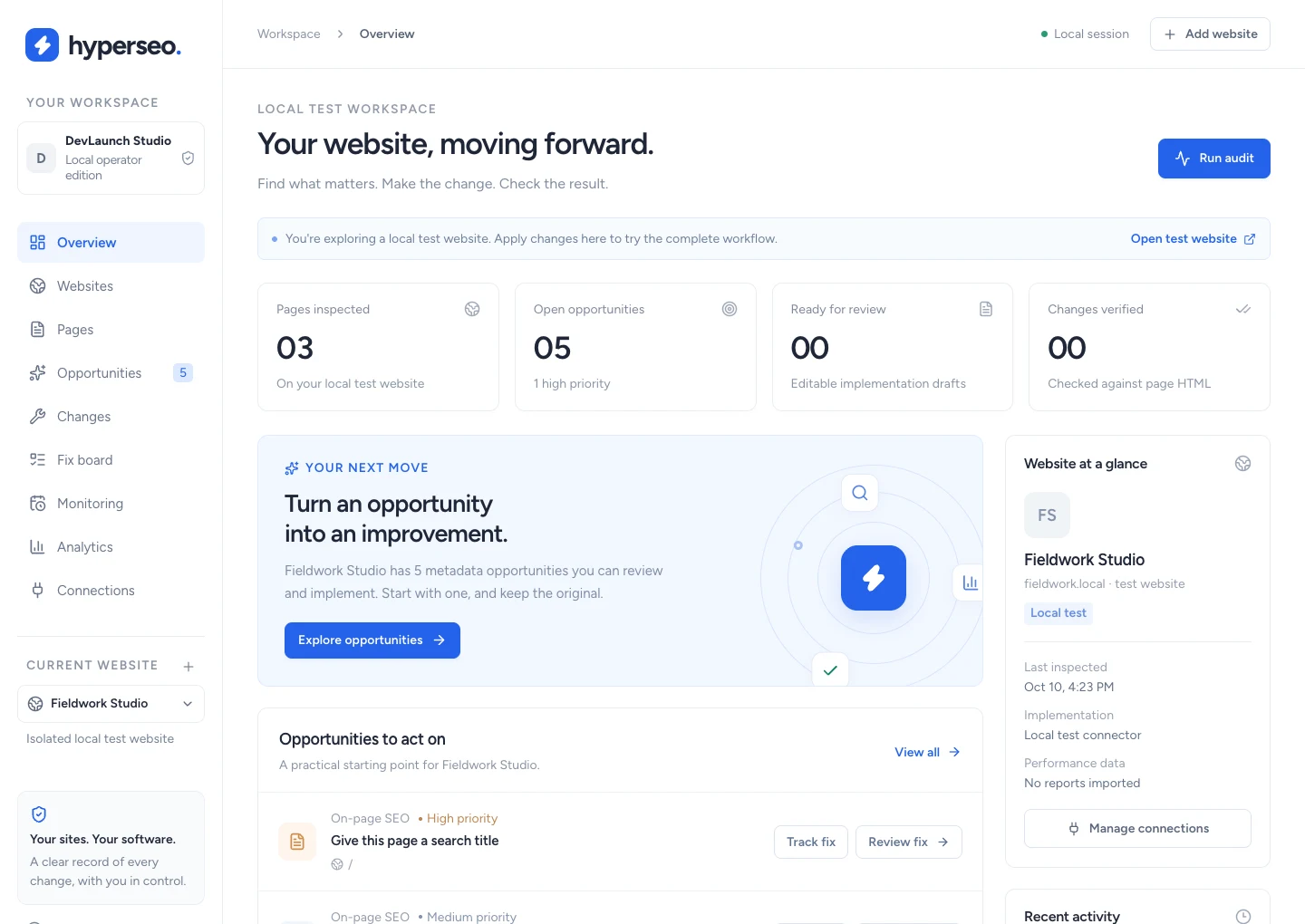
HyperSEO overview showing three inspected pages and five findings on the labeled local test website

Actual app screen from the included local test website. The tour below also uses labeled synthetic reports and provider fixtures; no customer results are shown.

Inspect the evidenceReview the changeVerify & restoreOwn your codebase

Know the next step.
Follow it through.

New in 0.6.0: URL-first reports, deeper page inspection, three research Explorers and Firecrawl connections for Claude Code and Codex.

A report from one URL.

Paste a public domain and get a saved audit, an executive summary and five prioritized actions. Add your branding before sharing the report.

  • Up to 25 public HTML pages per URL report
  • JavaScript-rendered inspection on up to 3 pages
  • Optional Google mobile Lighthouse check
  • Branded HTML export & browser print view

Find the next opportunity.

Use Keyword Explorer, Competitor Explorer and Backlink Explorer to research demand, compare search competitors and inspect link profiles.

  • Keyword volume, difficulty, intent & topic ideas
  • Competitor keywords, top pages & keyword gaps
  • Backlinks, referring domains, anchors & history
  • 14 research modes, saved captures & exports

Bring your agents into the work.

Use Firecrawl to gather web evidence. Connect Claude Code or Codex through MCP to review selected sites and submit cited AEO drafts.

  • Firecrawl search, page excerpts & URL discovery
  • Scoped, expiring, revocable agent connections
  • Human approval before paid research runs
  • Cited drafts reviewed into the fix board

A plan you can act on.

Rank work by severity, page importance, reported reach and estimated effort. Turn findings into a dated plan and tracked tasks.

  • Prioritized action plans & four-week plans
  • Near-page-one, low-CTR & declining queries
  • Query overlap and traffic diagnosis
  • Fix board with owners, dates & evidence

Content that sounds like you.

Save your brand voice, polish selected paragraphs and compare the rewrite with its source. Keep your judgment in every edit.

  • Brand Voice & editable paragraph rewrites
  • Number and protected-phrase checks
  • Contextual internal-link proposals
  • Content briefs & reviewed editorial tasks

Approve it. Then publish.

Review the exact change before applying it to a connected website. Keep the original, verify the rendered HTML and restore with checks.

  • WordPress metadata, content & internal links
  • Managed HTML on custom Next.js sites
  • Vercel connector with your own Neon database
  • Reviewed packages for JSX, MDX & other CMSs

See your AI answer evidence.

Track brands and competitors across saved prompts and audiences. Read the actual answers and citations behind every observation.

  • Prompt, audience & competitor libraries
  • Exact answer text, citations & review notes
  • OpenAI, Anthropic & Gemini API monitors
  • Mention/citation alerts & editorial gap tasks

Watch search changes.

Bring ranking, indexing and referral evidence together, with the source and scope visible so each comparison has context.

  • Regional organic SERP samples via DataForSEO
  • Search Console average-position watches
  • Google indexed-copy status & canonical checks
  • GA4 AI-referral sessions, events & revenue

Show what changed.

Compare matching reporting periods and create branded client reports. Keep measured results separate from verified implementation.

  • Search and analytics history & comparisons
  • Your branding on offline HTML client reports
  • AI evidence reports & JSON exports
  • Optional cited SEO analyst using your own key

Optional AI, Firecrawl and DataForSEO features use your own accounts and approved inputs. API answers and provider estimates are not measured traffic or total consumer exposure. Scheduled paid checks start paused; provider fees are separate.

Your work,
with the evidence beside it.

Explore actual screens from the updated workspace, using clearly labeled test data. Open each image to inspect the workflow.

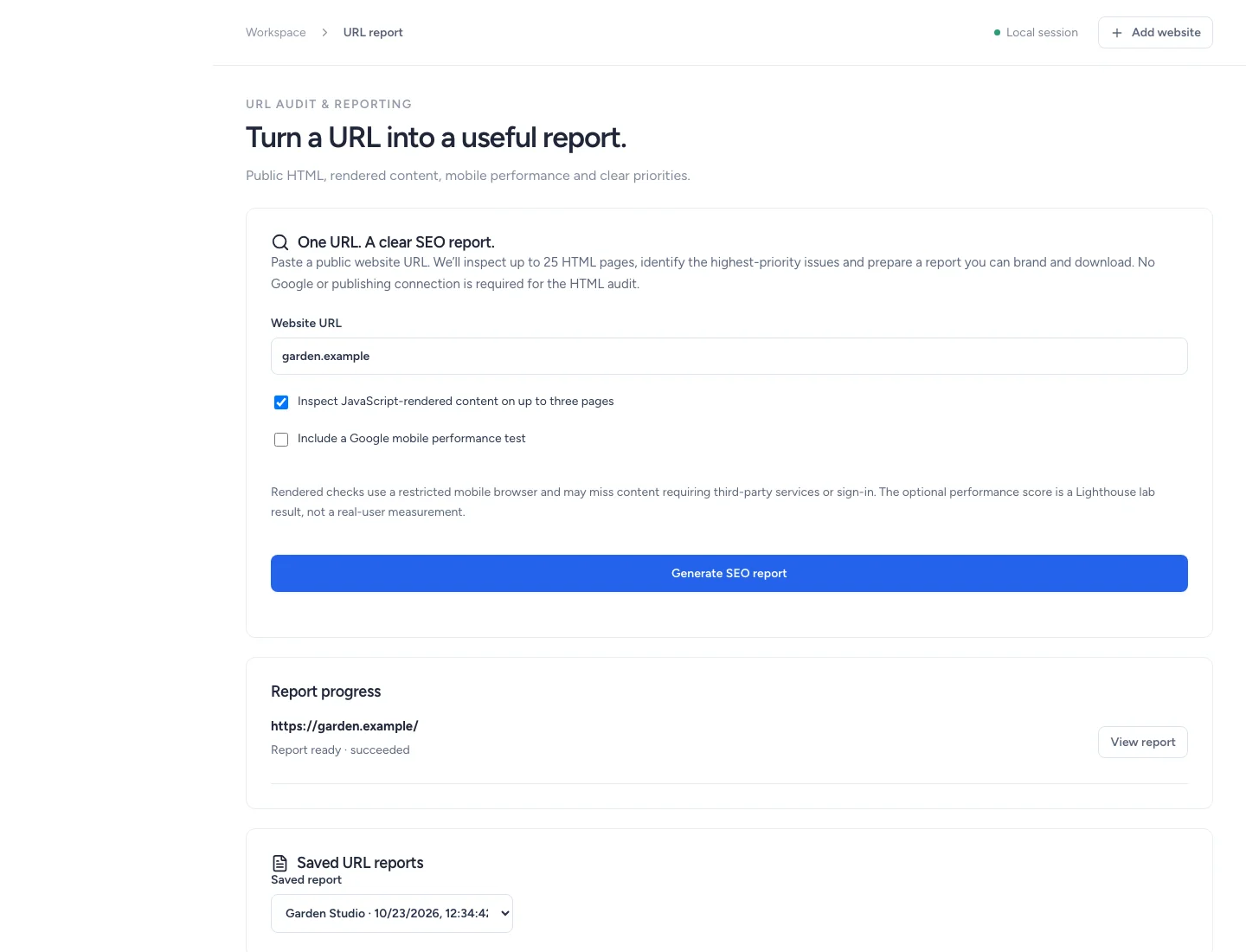
HyperSEO URL report with local test data

Paste a public URL, inspect its HTML and rendered content, then prepare a branded client report. Local test website / synthetic report and provider fixtures · View full size ↗

Keep the work moving.

Give every fix an owner. Let read-only checks run in the local worker. Keep live website changes in your hands.

Start with the actual page.

Audit public HTML for metadata, canonicals, headings, robots rules, sitemaps, structured data, image text and form labels. Inspect findings alongside your Search Console and GA4 evidence.

Checks on your schedule.

Queue audits and Google syncs. Enable daily or weekly checks, or opt in to paid AI and regional search samples. See progress, in-app alerts, failures and the worker’s status.

Evidence you can explain.

Retain audit snapshots, original values and implementation receipts. Show what was inspected and what changed. Measure business impact in your connected reports.

The computer and local worker must stay available for monitoring. Checks are read-only; live publishing needs your separate approval. Paid-check allowances help plan usage and do not guarantee provider invoices.

Your code. Your way of working.

Start locally.
Build your version.

Full Next.js and TypeScript source, local SQLite storage, install diagnostics and clear agent instructions. Customize the workflow for your own business and authorized client work.

Read the setup guide
  1. Download the package.

    Get the source ZIP, checksum, installation guides and WordPress/Next.js connectors from your DevLaunch library.

  2. Run the installer.

    Use Node.js 22.13+ and npm. Run npm run setup, then npm start. Practice on the included local test website.

  3. Connect your own evidence.

    Add websites you’re authorized to inspect. Configure the Google, publishing and AI/data connections you choose. Accounts and usage fees are separate.

Own your SEO workspace.

Buy HyperSEO on its own or download it as part of the DevLaunch All Access collection.

HyperSEO source code

$397 USD · one time
  • Complete application source
  • One-click URL reports & deeper page inspection
  • Keyword, Competitor & Backlink Explorers
  • Firecrawl, Claude Code & Codex connections
  • SEO audits, action plans & keyword opportunities
  • Content Polish, Brand Voice & internal links
  • Approved WordPress & Next.js publishing
  • Search, AI visibility & referral monitoring
  • Client approvals, team roles & agency portfolio
  • Private scheduled report drafts & HyperTask handoff
  • Reviewed GitHub pull requests
  • Results history & branded client reports
  • Setup, agent files & commercial source license
Get HyperSEO

All sales are final. No refunds, returns, exchanges or credits. Except where applicable law, payment-network rules or Whop terms require otherwise.

Local and optional authenticated agency modes. Self-supported. Provider accounts and fees are separate. Setup services, ongoing support, guaranteed future updates and SEO results are not included.

DevLaunch All Access

HyperSEO.
And more to build with.

Get HyperSEO with the eligible DevLaunch software collection, learning library and new releases during your access period.

  • HyperSEO included for eligible members
  • Software, classes, courses & resources
  • More tools to run and customize
Explore All Access

See All Access for current pricing, access duration and terms. Already a member? Check your library before buying again.

Already purchased or have All Access? Open your downloads

A few things to know.

Can I create an SEO report just by entering a URL?

Yes. Paste a public URL or domain to audit up to 25 HTML pages and prepare a saved report with an executive summary and five priorities. You can inspect rendered content on up to three pages and approve an optional Google mobile performance check. Add your branding and download HTML or use your browser’s print view. This is a bounded sample; traffic, rankings and conversions require connected evidence.

What can Claude Code or Codex do through the connection?

Read evidence for the sites and research captures you choose, propose Firecrawl research, and submit cited AEO drafts. You approve paid research and review proposed content in HyperSEO. Agent connections expire and can be revoked. They cannot access provider keys, approve spending or publish changes.

Are refunds available?

All HyperSEO source-code sales are final and non-refundable. No returns, exchanges or credits, except where applicable law, payment-network rules or Whop terms require otherwise. Review the features, setup requirements and source license before purchasing.

What am I buying?

The HyperSEO source code and documentation. Run it locally on your computer or configure the included authenticated agency mode for your team and clients. It is self-supported, with setup and agent guides included. It is not a managed online account.

What can it change on a live website?

WordPress supports compatible titles, descriptions and reviewed content or internal-link changes. The Next.js templates publish registered managed HTML, including on Vercel with your own Neon database. Each change needs a separate exact preview and Apply approval, with verification and guarded restore. Arbitrary JSX/MDX and other CMS workflows use a reviewed change package for manual integration.

Does it include Google data?

Connect your own Google OAuth project and authorized Search Console/GA4 properties, or import supported CSV exports. Each report keeps its source, date range and coverage. No Google account, provider subscription or invented traffic data is included.

Which optional services do I need?

The standard URL audit needs no provider key. Optional mobile Lighthouse testing sends the URL to Google and is subject to availability. Content Polish and the SEO analyst use your own OpenAI key. Scheduled AI samples support OpenAI, Anthropic and Gemini; the research Explorers and regional search samples use DataForSEO. Firecrawl needs your own API key; Claude Code and Codex use your own agent setup. Google data needs your own permissions, and Vercel publishing needs your own Vercel/Neon setup. Provider accounts, usage, hosting and fees are separate. Planning allowances do not guarantee your provider bill.

What does AI visibility measure?

Saved answers, brand mentions and cited domains in the samples you collect. API samples and manually captured consumer-app answers stay separate. They do not measure total consumer exposure. GA4 AI-referral reports show recorded source tags, not proof of the prompt that produced a visit.

Can I use this with client websites?

Yes. Use your locally run installation to audit authorized websites and deliver SEO services. The source license permits customization and client services while keeping the underlying source private. Agency mode includes separate workspaces, staff roles, assigned-site client access and exact-change approvals. It requires your own account backend and persistent Node hosting.

What happens when my computer is off?

The local worker runs while the app and your computer are available. Recurring checks start off. You can enable audits, Google syncs and separately approved paid API checks. Paid checks have call caps and planning allowances, pause/cancel controls and no automatic retries. Publishing still requires your explicit approval.

Will it improve my rankings or conversions?

HyperSEO helps you inspect evidence and carry out supported fixes. A verified HTML change confirms implementation. Rankings, traffic and conversions need separate measurement, and no SEO outcome is guaranteed.

Is HyperSEO included in All Access?

Yes, eligible DevLaunch All Access members can download it from the Software & code library during their access period. Check your portal before buying it separately.